Adding
Black-crested Titmouse
to Bird
Brain 5.0
If you
wish to add Black-crested Titmouse to the Reference database, here's
what to do.
From the
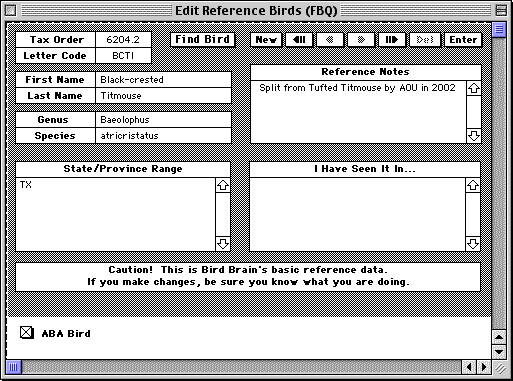
Reference menu, choose Edit Reference Birds. A window will open where
you can add the new species.
Click the
New button at center top of the window. You'll see the window with nothing
entered.
Enter the
following data:
Rec No: 6204.2
Letter Code: BCTI
First Name: Black-crested
Last Name: Titmouse
Genus: Baeolophus
Species: atricristatus
State/Province Range: TX
Reference Notes: Split from Tufted Titmouse by AOU in 2002.
Scroll
down below the Caution! sign and chec the ABA Bird box.
If you
have entered sightings for Tufted Titmouse which now properly belong to
Black-crested Titmouse, you may wish to visit those records and change
the Letter Code from TUTI to BCTI. When you Tab out of the Letter Code
field, the name of the species will change to Black-crested Titmouse.
Then press the Enter button.
The easiest
way to then update your lifelists is to then rebuild you life lists to
update your data.
From the
Records menu, choose Rebuild Life Lists... Click Rebuild all 6 Lists.
This may take a while if you have many records.
Home FAQ Tips
Stories Videos
Software Optics
Bookstore Orders
|