
| |
|
|
|
|
| Operating System | Recommended Computer | Minimum RAM | Recommended RAM |
|---|---|---|---|
| Catalina | Intel-based Mac | 2 GB | 4 GB |
| Mojave | Intel-based Mac | 2 GB | 4 GB |
| High Sierra v10.13 | Intel-based Mac | 2 GB | 4 GB |
| Sierra v10.12 | Intel-based Mac | 2 GB | 4 GB |
| El Capitan v10.11 | Intel-based Mac | 2 GB | 4 GB |
| Yosemite v10.10 | Intel-based Mac | 2 GB | 4 GB |
What are the files in the Bird Brain Folder?
When you first download Bird Brain, you will see four files in the Bird Brain Folder.

Bird Brain 7.4 (the cartoon bird icon) is the file you always use to launch the program. It appears as the name on the Application menu (the one to the right of the Apple menu) when you are running Bird Brain. In the folder, if your preferences are not set to show extensions, it may appear simply as Bird Brain 7.4.
Bird Brain User Guides is a folder that contains the PDF files that you access from the Bird Brain Help menu.
Bird Brain Backup Files is a folder that will contain backups of your data that you will create by using Make Backup File... command.
Bird Brain Records.USR is the file that contains your sighting data and the structure of the database. This is the file you copy to back up your database.
Can I rename or move the Bird Brain files?
Please leave the files in the Bird Brain 7.4 Folder alone! They need to stay in their respective folders and stay named as they are for the program to work properly.
"Exceeded number of records" message
Once you have 70 records in the trial version of Bird Brain, you will need to enter your name and new registration code before you can create a new record.
Go to the Help menu and click on Bird Brain Registration to open the window where you can enter your name and code. When you ordered Bird Brain or upgraded to a new version, you received an email containing the code.
When upgrading to Bird Brain 7.4, how do I get my records into the new version?
With Bird Brain open, look in the Bird Brain's File menu. You'll find Upgrading to Bird Brain 7.4.
The instructions in this short manual will take you through the process step by step.
 Always open Bird Brain by clicking on the Bird Brain 7.4 birdie icon in your dock. (Note that if your Finder's preferences are set to show extensions, this file will appear as Bird Brain 7.4.app.)
Do not open Bird Brain by clicking the Bird Brain Records.USR file. The program may or may not open, but it can create problems down the road. Just trust us on this.
Bird Brain 7.4 is the file you should drag to the dock. Then it will be easy to find, and you'll be sure to open the correct file each time you use Bird Brain.
Should I enter records in chronological order?
Bird Brain does not care what order you enter your records in.
You can begin by entering the birds you saw today, and enter older sightings tomorrow. Bird Brain will use the sighting date you enter in the record to sort out the chronology. Bird Brain will use the record with the earliest date in a Found Set as your life list record for that Found Set.
If menu items don't seem to work and the program seems stuck, check the following:
| You might be in Find mode. If so, click the Cancel Find button. |  |
| You might be in Print-Preview mode. If so, click the Exit Preview button. |  |
I'm trying to enter a record, and I can't find the bird!
Two reasons come to mind.
Sometimes I can find a bird and sometimes I can't.
There are two kinds of searches.
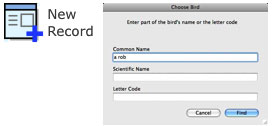
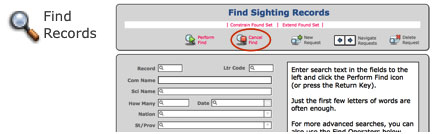
Sometimes, when just learning Bird Brain, it's easy to confuse the two kinds of searches. But now you understand it. Right?
How can I see which records still require photos?
If you want to find records without anything in the Species image field, then...
1) Choose Picture List from the View menu.
2) Click on the Find All Species Pics button.
3) Choose Show Omitted Only from the Records menu.
4) Click the Make Life List icon.
Now you have a Found Set of bird species with nothing in the Species picture field. You can view this list in different formats, which you can choose from the View menu.
Note also that you can add or replace images directly in the Picture List view.
___________________________________
If you want to find records without anything in the Sighting image field, then...
1) Choose Picture List from the View menu.
2) Click on the Find All Sighting Pics button.
3) Choose Show Omitted Only from the Records menu.
This time, don't click on Make Life List.
___________________________________
You can use the same strategy for finding empty Media image fields.
How can I make a life list for a specific city?
First make a Found Set of records for that city. Here's how.
 Next click the Make Life List button. This limits the list to the earliest record of each species. And voila! That's your life list for that city.
See a list of just the life birds I've gotten in a certain country
Voila! a list of just your world life birds that you first got in that nation.
When I print a list, I don't get the whole list!
To print a checklist or other list, choose Print with Format and Preview from the File menu. You may get a chance to enter a title or subtitle for you list. Click OK.
Now you'll get a preview of how your list will look when printed.
To print, clickon the Print icon at the top right of the page. A Print dialog box will open.

If the Print dialog box doesn't look like image above, click on the arrow icon to the right of the Printer field, or the Show Details button near the bottom, and the dialog box will expand.
Pages: Choose whether you want to print All or a range of pages. If you want all the pages to print, check All.
Print: Be sure you also check Records being browsed if you want to print the entire Found Set. For a Sightings List report, this is usually what you want, as it will print all the records on the list.
Current record means you want to print just one record, the current active record. If you're in the Sighting Record view, you'll print the record you're currently viewing. If you're in a list, you'll print a list with only one record on it, the currently highlighted record.
Blank record will show the fields but no data. You probably won't have a use for this choice.
Click the Print button.
For more details, see All About Printing in the Bird Brain 7.4 User Guide (found under Bird Brain's File menu).
Records missing from ABA life list.
If one of your ABA-area birds does not appear on your ABA life list, it may be missing the date.
To be eligible for a life list, a record has to have a valid date. Bird Brain looks at all the records and selects the earliest dated sighting for each species. If you don't know the date, you'll need to guess, or make up a date. (Some users enter their birth date for their earliest life birds, from before they started recording dates.)
Bird name is spelled differently from my field guide.
Bird Brain is based on the names in Clements world list. Inevitably, there will be discrepancies between lists compiled by different people. If the Clements list itself is wrong, it will eventually be corrected in an update. Whenever that happens, Bird Brain will automatically update the information, and all your records will update at that time.
Targetlist doesn't agree with life list
Targetlists show only those species that are on that state or nation's checklist. However, Make Life List will create a lifelist from any Found Set. For example, say you entered Ostrich in a record and had the state as New York. Then Ostrich would appear on a New York lifelist. But it would not appear on a New York targetlist. And therefore your two totals would not agree.
Yes. From the Records menu, click Renumber Sighting Records. Bird Brain will renumber all your records so that they start with Number 1 and leave no gaps in the sequence. This is not necessary to the operation of Bird Brain, but the function is available if you want it.
How do I save my work in Bird Brain?
Bird Brain automatically saves your work whenever it is inactive for five seconds. You don't have to choose Save from a menu.
If you have just entered a whole lot of records when the dog unplugs your computer for you, all of your records should still be intact.
However, you still need to back up your database. For safety, back it up to some device exernal to your computer.
Does Bird Brain know all the ABA Areas and Regions?
No. Bird Brain assigns an area or region based on what's in the Nation field. However, sometimes a nation straddles two Areas or Regions. Examples are Russia and Turkey, which are partly in the Europe and Western Palearctic Area and partly in the Asian Area. Bird Brain may choose the wrong Area for a particular location within such a country.
Also, Bird Brain does not know every island. Records for some islands will not be automatically assigned an Area or Region in the Auxiliary Info tab of the Sighting Record view, even though they do belong to those Areas or Regions.
Bird Brain's automatic Area and Region choices are best guesses, and you can override them if necessary. For some parts of the world, such as those mentioned above, you may need to monitor the Area and Region fields and change what is automatically entered.
Note: Bird Brain does know that Hawaii is in the AOU Area and not in the ABA Area. If you have records for which the Nation is chosen as US and the State/Prov as HI, you will find those records represented on an AOU lifelist but not on an ABA lifelist.
For the automatic Area and Region assignment to work at all, what's entered in the Nation field must agree with what's in the drop-down menu. If it doesn't, Bird Brain won't be able to choose the ABA areas or Regions for that record.
The utility, Nation Names to Normalize, found in the Nations checklist menu, will find any records in which the Nation names are missing or not "normal."
For more details on the precise description of ABA Areas and Regions, please visit the ABA's website, ABA Listing Areas.
Can I use Bird Brain on two computers?
Yes. You need to install the Bird Brain 7.4 Folder on both computers. If you've installed it on one, you can drag the whole folder, with all its included files, to the Documents folder on the other computer.
Now, to transfer records data, you only need to copy the Bird Brain Records.USR file back and forth between the Bird Brain 7.4 Folders on both machines.
There is always the risk that you could copy the file in the wrong direction and lose data. However, if you do regular backups on both machines, you can protect yourself from that.
I've recently bought a Mac. Can I tranfer records from AviSys to Bird Brain?
We can do a custom import of your Avisys data. The fee is usually $20. If you want to send us a file with your data in it, we will take a look at it and tell you if it will work. No charge for looking. Here's how to do the proper export of your data from Avisys:
If you have a big file with many records, you can transfer the file to us here.
Or if it's a small file, you can email us an attachment.
Can I convert records from other programs to Bird Brain?
Please email us a sample of your exported data as a spreadsheet. A tab- or comma-delimited text file or an Excel worksheet would be great. Please include field names, as column headings, so we know what the data means.
We'll take a look at your data and see if we can format it for Bird Brain. No charge for us to look at your data. If we can do a conversion, we'll let you know, and we'll let you know how much it would cost. Then you can decide whether you wish to ask us to do the conversion for you.
How do I export records from Bird Brain 5 to move into Bird Brain 7.4?
See instructions here.
Contact the authors / publisher
Phone 800-779-7256 or 641-472-7256
Write to us at:
Birdwatching Dot Com
2197 236th Blvd.
Fairfield, IA 52556
USA
.